
You can do keyword research for free. Google’s own data sources — Autocomplete, People Also Ask, related searches, Trends, Keyword Planner and Search Console — plus a spreadsheet will give you a keyword shortlist that holds up, and the whole process takes about an hour for a first pass.
The catch is that free tools scatter the work across several places. None of them hands you a finished list, so the skill is really about moving between them without burning out on daily search caps.
Table of Contents
What You Need
Nothing here costs money. You need a spreadsheet (Google Sheets or Excel both work fine), a current browser, and about an hour for a first run.
Google Trends, Autocomplete and People Also Ask need no account at all. Google Keyword Planner needs a free Google Ads account, and it does not ask you to run a campaign or spend anything to see keyword data. Google Search Console only works on a site you own, so if your site is brand new it may return nothing yet — the workaround is in step 3.
One optional extra: a free third-party tool for volume and difficulty numbers. Pick one, not five, because the daily caps add up fast.
- A spreadsheet with columns: keyword, intent, monthly searches, difficulty proxy, SERP type, priority score
- Google Trends for demand and seasonality
- Google Autocomplete and People Also Ask for phrasing
- Google Keyword Planner for rounded volume ranges and cost per click
- Google Search Console for queries your site already earns impressions on
- Optional: one free tier of a third-party platform such as Mangools, AnswerThePublic or a keyword generator site
Step-by-Step: How to Do Keyword Research for Free
Seven steps, in order. The order matters more than the tools: expand first, judge later. Filtering early throws away good long-tail phrases before you understand them.
1. Define the Topic and Search Intent
Write one sentence naming your topic, your reader and the outcome they want. “A beginner gardener in a cold climate who wants tomatoes to survive” is a workable version. “Gardening” is not.
Then guess the intent behind the search, because intent decides what content you build:
- Informational — the searcher wants to learn. “when to prune hydrangeas”. Build a how-to guide.
- Commercial — the searcher is comparing options. “best cordless drill for a beginner”. Build a comparison or review page.
- Transactional — the searcher wants to buy or download now. “buy hydrangea soil online”. Build a product or category page.
- Navigational — the searcher wants a specific site. Usually not worth targeting unless it is your brand.
Your check: every seed keyword you are about to collect should map to the same planned content. If a phrase needs a different page type, park it for a later article.
2. Create a Seed Keyword List
Seed keywords are the handful of broad phrases everything else expands from. Ten is plenty.
Build them from four sources: your own topic, the questions your reader would actually ask, synonyms and alternate spellings, and the terminology your industry uses. Talk to a customer or read support tickets if you can — real phrasing beats textbook phrasing every time.
Watch for drift. Start with “pruning hydrangeas” and you may wander into “pruning shears”, a completely different commercial intent. Keeping the seeds tight is what makes step 3 useful.
3. Collect Autocomplete and Search Suggestions
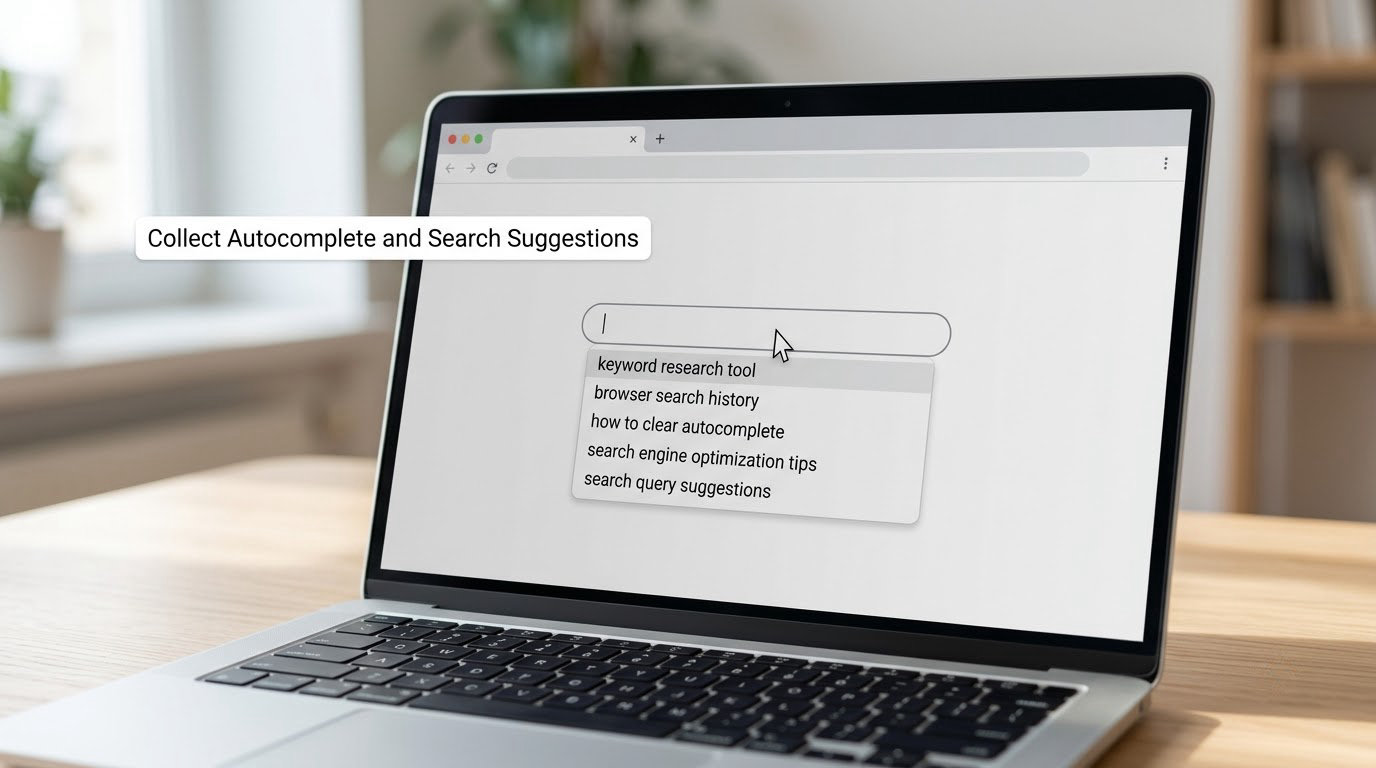
Open a private browser window and type each seed. The dropdown is Google’s own log of what real people type, and it is free. Save every suggestion that looks relevant.
Three tricks widen the list fast:
- Add a space after each seed letter, from a to z, and log what appears. This surfaces phrases autocomplete normally hides.
- Type an underscore, as in “best laptop_”, and Google fills in the rest. Underscores trigger completions you cannot reach any other way.
- Scroll the search results page to the People Also Ask box and the related searches strip at the bottom. Copy both into the same column.
Skip repetitive variants, phrases with a city or brand name inserted, and anything that drifted outside your topic.
4. Check Demand With Free Trends Tools
Drop each candidate into Google Trends and compare interest over time. Set the range to twelve months if the topic is seasonal.
Trends gives you direction, not a monthly search count. It answers “is this rising, flat or fading” and shows the shape of demand. Use the region filter to separate your market from global noise, and check the Related queries tab, where Rising terms often expose a subtopic nobody has covered properly yet.
Rising phrases are worth a second look. A term going from near nothing to steady searches usually has weak competition behind it because nobody planned for it.
5. Inspect Search Results for Relevance
Search each candidate phrase and actually read the top results. This is the closest thing to a free keyword difficulty score, and most guides skip it.
Look at who ranks. If every result is a major publication or a huge retailer, expect a long climb. If you see small blogs, forum threads, outdated pages or thin listicles, the field is soft and you can compete.
Also note the format. A query that returns video carousels wants a video. One that returns product grids wants a buying page. One that returns a definition box wants a short, direct answer near the top.
If the results are completely unrelated to what you planned, the phrase is not your keyword. Move on.
6. Run Free Keyword Research and Score the Shortlist
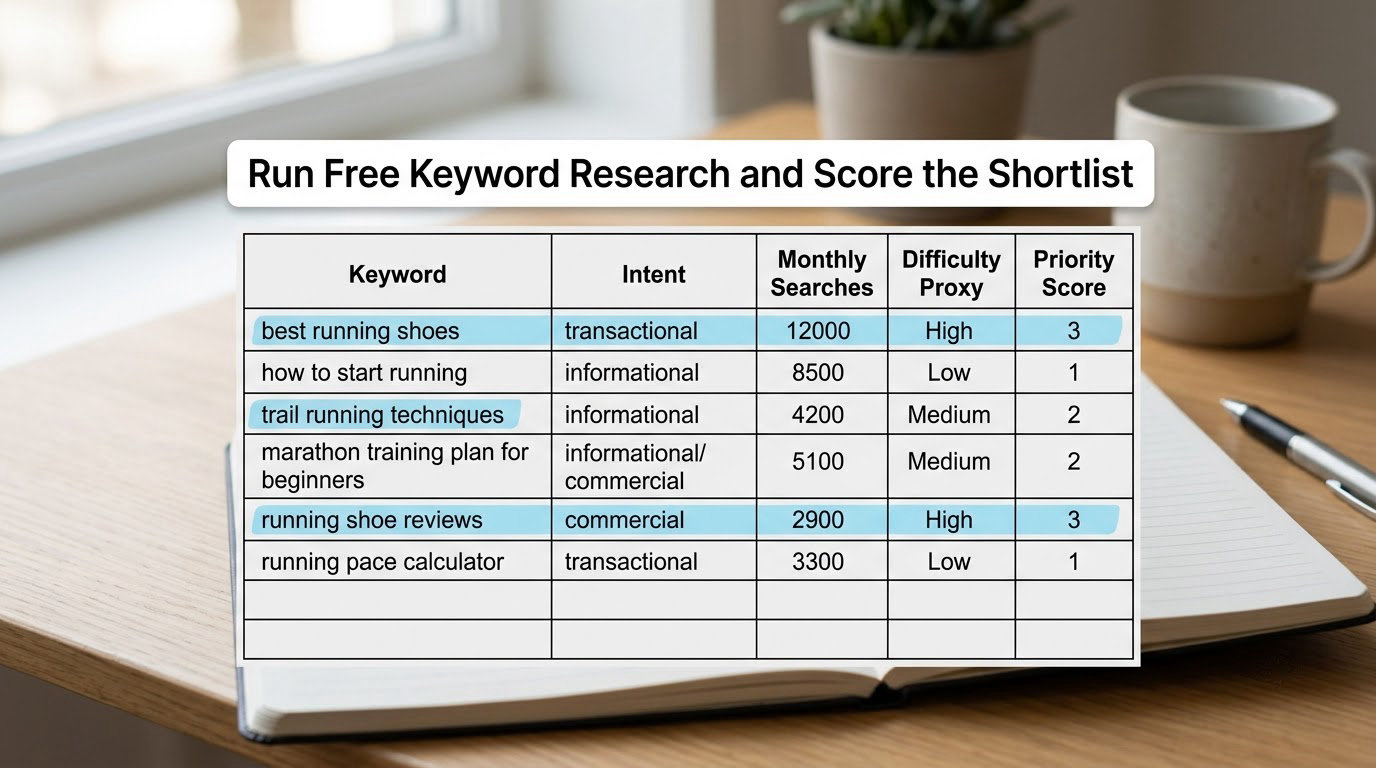
Now pull volume and difficulty signals. Free tiers exist, and the limits are the part worth knowing:
- Ahrefs keyword generator: roughly 20 results per keyword, no account needed
- AnswerThePublic: about 3 searches a day
- KWFinder: about 5 searches a day
- AnswerSocrates: about 1 search a day
- Ubersuggest free tier: a handful of searches a day
Read those numbers skeptically. Free tiers usually return ranges such as 10-100 or simply “>1000”, and users on SEO forums repeatedly complain those buckets are useless for decisions. Treat a bucket as a yes-or-no filter, never as a number to plan around.
Score each candidate out of ten instead. Give it up to four points for business fit, three for how relevant the current results look, two for demand (flat or rising beats falling), and one for how specific the phrase is. Anything scoring seven or higher goes on the shortlist.
Your shortlist should be specific and reachable. Ten mid-tail phrases you can write well beat one head term with 100k searches you will never touch.
7. Group Keywords by Topic and Search Intent
Sort the shortlist into one primary keyword, two to four secondary keywords, supporting phrases that belong in subheadings, and question phrases for an FAQ section.
One article can carry all four groups if they share a single intent. “how to do keyword research for free” as the primary, “free keyword research tools” and “keyword research process” as secondaries, terms like “search volume” and “keyword difficulty” as support, and “what is keyword research” as a question.
Give each cluster its own article and its own intent. When two pages chase the same phrase, they split the signals and neither ranks well — the fix is one page, one primary keyword.
Common Mistakes
Chasing volume over relevance. A large number on a phrase your readers never use brings traffic that never converts. Fix: require a business-fit score before volume earns any points.
Going after head terms first. “SEO” is not a beginner’s keyword. Fix: aim at phrases of four words or more, where the results are thinner.
Treating a free difficulty score as exact. The same keyword scores wildly different numbers in different tools, which is why users on SEO forums stop trusting them. Fix: ignore the number, read the top ten results.
Ignoring intent. Writing a blog post for a query that wants to buy wastes the effort. Fix: classify intent from the SERP, not from the words in the phrase.
Skipping question keywords. People Also Ask and answer boxes are easy wins that most beginners never collect. Fix: harvest them in step 3 and answer each one directly in an FAQ section.
Targeting the same keyword on several pages. Fix: one primary keyword per URL, logged in the spreadsheet so you can check for overlap before publishing.
Never updating the list. Trends shift and results change. Fix: re-run the whole process quarterly, and mine Search Console queries where you sit between positions 11 and 20, since those are the cheapest wins available to you.
One honest limit worth stating: Search Console is your best free source of real data, but a site with no impressions yet has none. Until then, lean on Autocomplete, Trends and manual SERP checks.
Frequently Asked Questions
What is the best free tool for keyword research?
For most beginners, Google Search Console is the best free tool because it shows queries that already earn your site impressions, which no other free source can do. For discovering new ideas, Google Autocomplete and Trends are hard to beat and need no account. Pair them with Keyword Planner for volume ranges. One tool rarely does the whole job, and the free limits make mixing several a practical necessity.
Can I do keyword research without paying for an SEO tool?
Yes. Everything needed to build a usable shortlist is available at no cost: Autocomplete, People Also Ask, related searches and Trends for phrasing and demand, Keyword Planner for rounded volume and cost per click, Search Console for your own queries, and manual SERP inspection for difficulty. Paid platforms mainly save time and add historical rank tracking, not information you cannot find yourself.
How accurate is Google Keyword Planner without spending money?
Without active ad campaigns, Keyword Planner rounds volumes into wide buckets such as 10-100 or 100-1,000, and cost per click figures become generic averages. The directional picture still holds, so the tool is useful for separating a term with no demand from one with real demand. Do not build forecasts on the exact numbers, and cross-check important terms against Search Console data.
What counts as a good keyword difficulty score?
On free tiers, treat difficulty as weak evidence. A score matters less than what the top results look like: if small sites, forums or thin pages rank for the phrase, the competition is beatable. Scores also disagree sharply between tools, so a number from one platform is not comparable to another. Judge the results page, then let the score break ties.
How many keywords should I use in one article?
One primary keyword per page, then two to four closely related secondary phrases, several supporting terms inside subheadings and body copy, plus the questions you want to answer in an FAQ section. Stacking more terms rarely helps and often blurs the focus. If two phrases need different content types, they need different articles.
Start With One Strong Keyword
Pick a single primary keyword that matches what your reader wants, check what currently ranks for it, and keep the page only if the results look winnable.
Then map the closest supporting phrases into that same article and record them in your spreadsheet with a publish date. One focused page, honestly researched, beats a list of twenty half-researched ones every time.